
How to Caption Old Photos So the Story Isn't Lost
A caption template for old family photos, how to write on a print without damaging it, and how to keep the details with the digital copy.
To caption an old photo, write down four things: the approximate year, the full names of the people in it, the place and what was happening, and who told you. A guess like "about 1962" is better than a blank. On the print itself, write lightly in soft pencil on the back, near the edge, never on the front. For a digital copy, keep the caption with the file so it travels wherever the photo goes.
Most families have a box of photos where nobody alive knows who half the people are. That happened one uncaptioned print at a time. The person who could have named everyone was in the room once, and nobody wrote it down. This guide covers what to write, where to write it, and how to get the details from the people who still remember.
What to Write in a Photo Caption
A good caption answers four questions. You won't always have all four, and that's fine. Write what you know.
1. When: the approximate year
An exact date is rare. An approximate year is almost always possible, and it's the detail people search for later. Write it the way you'd say it: "about 1962," "late 1950s," or "before 1945, since Grandpa is in it." Note why you think so if it isn't obvious.
2. Who: full names, written the same way every time
Write each person's full name, including maiden names where you know them: "Ruth Ellen Carter (later Ruth Novak)." Pick one spelling for each person and use it on every photo. "Aunt Ruth," "Ruthie," and "R. Novak" look like three people to anyone who comes later.
For a group photo, name people in order and say which order: "Back row, left to right: ..." If you don't know someone, say so in their place, such as "unknown man in a hat," so the count still matches the faces.
3. Where and what: the place and the occasion
"Lake George, New York, at the Carters' rented cabin, summer vacation" tells a future reader far more than "the lake." Name the street, the town, the house, the church, or the event when you can.
4. Who said so, and how sure they were
This is the step most people skip. Add a short note on where the information came from: "Identified by Marian Carter, 2026" or "Uncle Joe thinks this is the 1958 reunion, not sure." When two relatives disagree later, the note tells everyone which version came from someone who was there.
A Caption Template You Can Copy
Here's the pattern, with one filled in:
Year: about 1958
People: Back row, left to right: Walter Carter, Ruth Carter (later Ruth Novak), unknown woman. Front: Marian Carter, age 6.
Place and occasion: Carter family cabin, Lake George, New York, Fourth of July.
Source: Identified by Marian Carter, 2026. She's sure of everyone but the woman on the right.
How to Write on the Back of a Photo
If you write on the print itself, a few habits keep it safe:
Use a soft pencil, and press lightly. A soft graphite pencil, such as a 2B, writes on most older paper prints without denting them.
Write near the edge of the back, not behind faces. Pressure can show through to the front.
Avoid ballpoint and felt-tip pens. Ballpoint dents the paper, and many inks bleed, smear, or transfer onto the photo stacked below.
For glossy, plastic-coated prints, pencil won't stick. Use a pen made for photos, often sold as a photo-safe or archival marker, and let the ink dry before you stack anything on it.
Skip sticky notes, tape, and adhesive labels. They fall off, and their glue can stain the print over time.
Never write on the front.
Before you write anything, photograph the back. It may already have a developer's date stamp, a studio name, or someone's handwriting, and those are part of the record. Our guide to scanning old photos with your phone covers copying both sides.
Clues for Dating an Undated Photo
When nobody remembers the year, the photo itself often narrows it down:
Date stamps. Many photo labs printed the month and year on the back or the border of the print.
Print shape and border. Scalloped, deckled edges were common from about the 1940s into the 1960s. Square prints with white borders often point to the 1960s and 1970s.
Cars, clothes, and hairstyles. A car's model year sets the earliest the photo could have been taken.
The people you can name. If you know a child's birth year, how old they look gives you a range.
Other photos from the same roll. Prints developed together usually share a size, a border, and a stamp. Date one, and you've dated the set.
Write the range you can support, such as "1955 to 1960," and the reason.
Caption With the People Who Remember
The best captions come from sitting down with the relatives who were there. Bring the photos, or show them on a tablet, and keep the session short. Write as they talk. A recording on your phone helps, as long as everyone agrees to it.
Ask open questions: "Who's this?" "Where was this taken?" "Do you remember what was going on that day?" One photo often unlocks a story that explains a dozen others.
Don't wait for a perfect project to start. Caption the photos you can today, and come back to the rest. The photos can wait. The relative who can name everyone in them may not.
Keep the Caption With the Digital Copy
A caption in a notebook is easy to separate from the photo it describes. Once you've made digital copies, keep each caption attached to its file:
Name files so they sort in order, such as "1958-carter-cabin-lake-george-01.jpg."
Store the details where they'll travel with the photo, such as in an archive that keeps them per photo, or in a spreadsheet that lists each file name next to its year, names, and description.
Keep one master copy that the whole family adds to, instead of five versions in five group chats.
Our guide to building a family photo archive with your relatives covers how to run that kind of shared project.
How EventPix.photo Handles This
A Family History Collection from EventPix.photo is built around these captions. You share one upload link, or its QR code, and relatives add photos from their phone's browser, with no app and no account. Each photo has three detail fields:
Approximate Year, with the hint "A guess is fine. 'About 1962' or 'late 50s' beats leaving it blank."
Description, for the place, the occasion, and the story.
People in this photo, for the names.
The family members who run the Collection sign in as curators to review what arrives, fill in details, and fix spellings so every name is written the same way. Nothing a contributor uploads appears in a gallery or slideshow until a curator approves it, and photos nobody can date yet can still be approved and identified later.
The owner and admins can download everything as a ZIP of the original photos, along with a spreadsheet of every year, name, and description. Ownership can be transferred, so the archive can pass to the next generation.
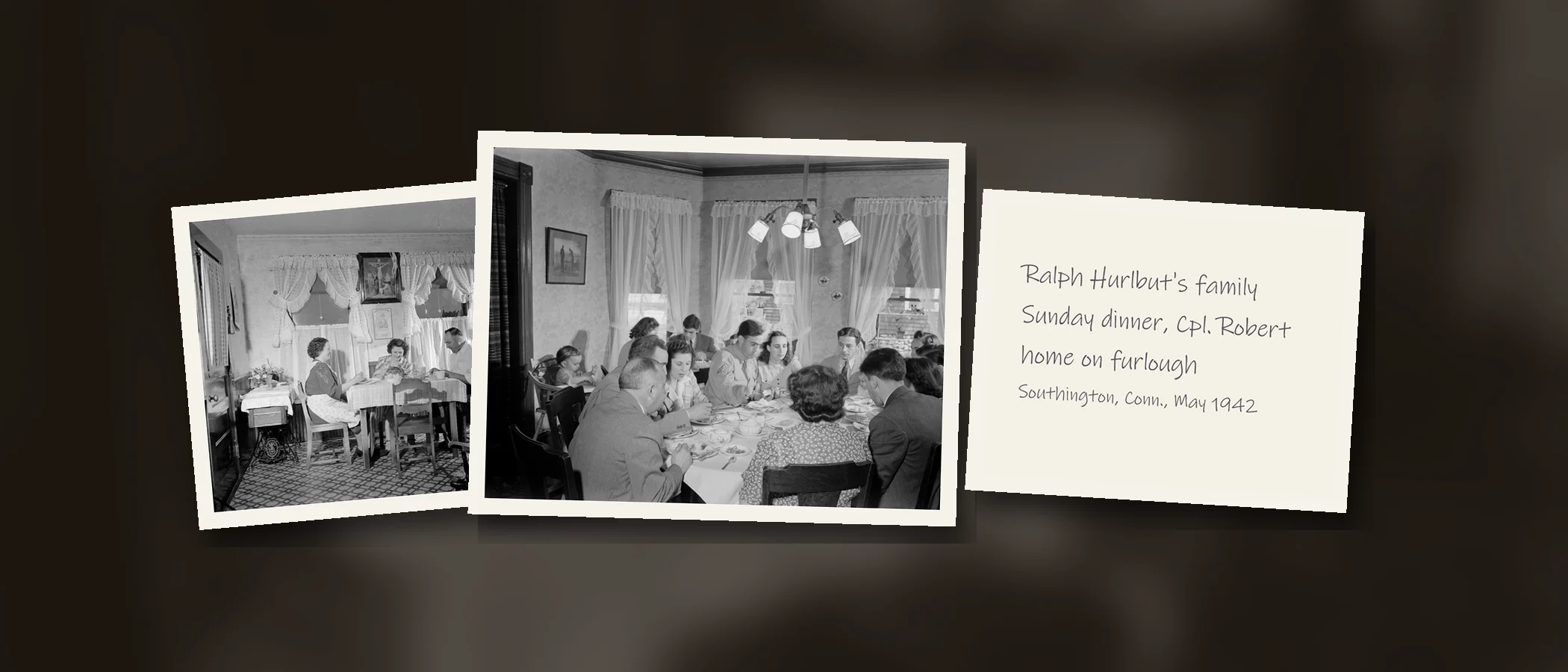
A Collection costs $229 a year, or $179 for verified schools and nonprofits, and includes 100 GB of storage. To see what finished captions look like, browse our sample Collection of Southington, Connecticut, with photos from about 1920 to 1942. Here's one photo from it, with its caption, year, description, place, photographer, and source beside it:
Frequently Asked Questions
Is it OK to write on the back of an old photo?
Yes, if you use a soft pencil and press lightly near the edge. Avoid ballpoint, felt-tip, sticky notes, and labels. For glossy, plastic-coated prints, use a pen made for photos and let it dry.
What if nobody knows who's in the photo?
Caption what you can: the approximate year, the place, the occasion, and "unknown" for each person you can't name. Then show it to relatives from that side of the family. A photo the whole family can see has a far better chance of being identified than one in a single person's box.
Should I caption the original print or the digital copy?
Both, if you can. A light pencil note on the print protects the story if the files are ever lost, and a caption kept with the digital copy is the one the rest of the family will see.
How much detail is too much?
Rarely any. If a relative tells you a story about a photo, write it down. You can shorten it later, but you can't get it back.